Posts

Showing posts with the label Google

The best pure Android phones right now

Image
Well, the wait is over, two of the most popular android phones, Samsung’s Galaxy S4 and HTC’s One, are now available directly from the Play Store running an unadulterated version of the OS. And Google says they’ll start shipping by July 9. The so-called Google Play Edition S4 and One can now be purchased without their respective manufacturer customizations for $649 and $599, respectively. So today, I have collected a list of Pure Android phones sure to tempt your inner Android purist. 1.   HTC One Google Play Edition The current king of stock Android smartphones I think is the HTC One, not Nexus 4. The HTC One Google Play Edition's metal design is gorgeous and as everyone knows, the phone's hardware and components are top-notch. The clean Android Jelly Bean UI is refreshingly simple, and Google promises a stream of fresh updates as they happen. The bad: The HTC One Google Play Edition comes with 32GB of non-expandable storage. 2.   Samsung Galaxy S4 Google Play Edition The S...
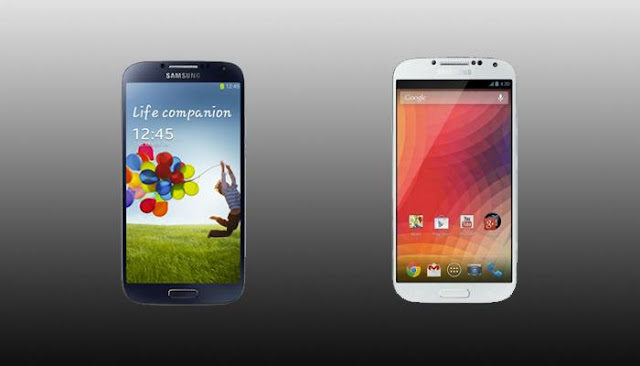
Whoa! Google's Selling a Pure Android Samsung Galaxy S4 on Google Play

Image
Exciting news for all Android and Google lovers, Google just pulled out a Samsung Galaxy S4 on the Google I/O stage, unlocked, with Stock Android , on Google Play starting June 26. It has an unlocked bootloader, and supports LTE. The device runs on both T-Mobile and AT&T's LTE networks and comes with 16GB of storage. News said the new Samsung galaxy s4 hit 4 million shipments between April 26 (release date) and April 30, and had reached 6 million units sold by May 10. On the S4, the handset features a 1080p screen with 441 ppi, a 13 megapixel camera, and a powerful Qualcomm Snapdragon processor or octa core Exynos chip are among its most impressive pieces of hardware. So should you buy Google's $649 Galaxy S4 or Samsung’s phone? Familiar hardware, different software The appeal of this new GS4, of course, depends on your take on Samsung’s and Google’s software. If you want the most features, you’re probably still better off with the standard Samsung version. It gives you...

How to get started with Google Keep on your Android Device or PC

Image
Google yesterday officially announced its new note-taking service, named Google Keep , which allows users to sync notes and to-do lists across your computer, phone and tablet using your Google account. But now the app right now is only available for android devices running Android 4.0.3 and up , or through the Google Drive Web site. Today here I will introduce you how to get started with Google's new note-taking app Keep. Of course, in order to get started with Google Keep on your android device, you should download the Android app and install it on your device in advance. You can find the tool at drive.google.com/keep or in the Play Store for Android 4.0 and up. After installing the app you'll be prompted to select the Google account you want to use with Keep. Once that's done, you can begin keeping notes. There are four different methods you can use to enter a note: A quick note directly from the text box on the initial screen. Add a checklist by tapping on the check m...

How to get rid of annoying mobile ads on your Android Phone

Image
Sometimes when you try to download android apps from Google play app store or play downloader games like Angle Bird, they sometimes push annoying ads to your smartphone, and you find it really boring that you want to remove all the annoying ads on your android device. But how to get rid of these annoying mobile ads on Android Phone ? Being a long android lover, I have discovered a list of good tips and powerful apps for you here. If you have the same problem, Follow the Tutorials to have a try and you will find it really useful. 1. Download free app called AirPush Detector AirPush Detector is the app that detects other installed applications to see which apps appear to use notification ad frameworks and users can easily uninstall them. The app can't block ads, but at least it can tell you which apps are causing them. So you must uninstall the app to stop the ads. Now for the trick After you've detected and deleted the apps which push ads, head to the Google Play Store. Once i...